iFANN
    iFANN durchsuchen...
    Anmelden
    Startseite
    Nachrichten
    Videos
    Fotos
    GIFs
    Entdecken
    Umfragen
    Auszeichnungen
    iFAMOUS
    Wiki
    Anime
    Räume
    Benachrichtigungen
    Nachrichten
    Lesezeichen
    Profil
    WikiAuszeichnungeniFAMOUSRanglistenBranchenCreator-BelohnungenBenutzerbelohnungenNutzungsbedingungenDatenschutzCommunity-RichtlinienEntfernung / DMCAHilfeEntwickler

    © 2026 iFANN

    Startseite
    Suche
    Nachrichten
    Alarme
    Profil
    Foto
    Jackie
    Jackie@jackie_472w
    💭Tech💭AI
    Grok Bot AI coding workflow with Cursor agents

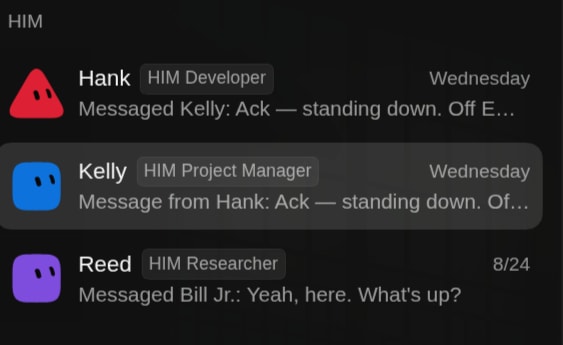
    @jackie_47If you're not using Grok Bot for AI coding yet, this workflow might change your mind. I've been testing it out, and honestly, it's the most effective setup I've come across. The secret isn't just the model itself, but how you structure your bots. You need a dedicated developer bot and a project manager bot. The developer bot spawns Cursor cloud agents to handle the actual coding, while the PM bot keeps an eye on progress and grants permissions as needed. The PM bot uses a board, either in Notion or Linear, to track everything, and both have free plugins that work seamlessly with Grok Bot. Here's the flow: the PM bot breaks down a project into tasks in Notion or Linear, then feeds them one by one to the developer bot. Each task turns into a pull request, so you can test and merge while the bots keep working. It's basically a self-running software factory. The code quality is top-notch because Cursor cloud agents are that good, and you stay organized since every task has its own tracked PR. I've shifted about 90% of my AI coding to this method, and I'd recommend setting it up for your next build. Pro tip: share this with your chief of staff bot to automate the whole setup

    Originalbeitrag ansehen
    Grok Bot AI coding workflow with Cursor agents

    Foto von @jackie_47· Sep 5, 2026· Tech

    Über dieses Foto

    The image shows a dark-themed messaging app interface. The focus is on three conversation threads with distinct colored avatars and names. Hank, a HIM Developer, messaged Kelly, a HIM Project Manager, with the text "Ack — standing down. Off E...". Kelly's conversation with Hank is highlighted, indicating it's the active or most recent one. Reed, a HIM Researcher, messaged Bill Jr. with "Yeah, here. What's up?". The overall mood is functional and informative, typical of a work-related communication platform. The avatars are simple, pixelated characters.

    Alle Fotos von Tech ansehen

    ?

    Mehr Fotos von Tech

    Alle Fotos von Tech ansehen
    Hermes local models one-click setupHermes local models one-click setupOmarchy AI OS 20263Omarchy AI OS 2026Mac Studio M5 Ultra releaseMac Studio M5 Ultra releaseBuzz AI agents from JackBuzz AI agents from JackGame developer on AI and vibe codingGame developer on AI and vibe codingClaude Sonnet 5 releasedClaude Sonnet 5 releasedLocal AI computer guide2Local AI computer guideAlex Finn Hermes Agent updateAlex Finn Hermes Agent updateMac Studio 96GB availableMac Studio 96GB availableGLM 5.2 open weights modelGLM 5.2 open weights modelSam Bankman-Fried investments Cursor SpaceXSam Bankman-Fried investments Cursor SpaceXAlex Finn Mac Studio DGX Sparks setupAlex Finn Mac Studio DGX Sparks setup
    Foto
    Jackie
    Jackie@jackie_472w
    💭Tech💭AI
    Grok Bot AI coding workflow with Cursor agents

    @jackie_47If you're not using Grok Bot for AI coding yet, this workflow might change your mind. I've been testing it out, and honestly, it's the most effective setup I've come across. The secret isn't just the model itself, but how you structure your bots. You need a dedicated developer bot and a project manager bot. The developer bot spawns Cursor cloud agents to handle the actual coding, while the PM bot keeps an eye on progress and grants permissions as needed. The PM bot uses a board, either in Notion or Linear, to track everything, and both have free plugins that work seamlessly with Grok Bot. Here's the flow: the PM bot breaks down a project into tasks in Notion or Linear, then feeds them one by one to the developer bot. Each task turns into a pull request, so you can test and merge while the bots keep working. It's basically a self-running software factory. The code quality is top-notch because Cursor cloud agents are that good, and you stay organized since every task has its own tracked PR. I've shifted about 90% of my AI coding to this method, and I'd recommend setting it up for your next build. Pro tip: share this with your chief of staff bot to automate the whole setup

    Originalbeitrag ansehen

    Grok Bot AI coding workflow with Cursor agents

    Foto von @jackie_47· Sep 5, 2026· Tech

    Über dieses Foto

    The image shows a dark-themed messaging app interface. The focus is on three conversation threads with distinct colored avatars and names. Hank, a HIM Developer, messaged Kelly, a HIM Project Manager, with the text "Ack — standing down. Off E...". Kelly's conversation with Hank is highlighted, indicating it's the active or most recent one. Reed, a HIM Researcher, messaged Bill Jr. with "Yeah, here. What's up?". The overall mood is functional and informative, typical of a work-related communication platform. The avatars are simple, pixelated characters.

    Alle Fotos von Tech ansehen

    ?

    Mehr Fotos von Tech

    Alle Fotos von Tech ansehen
    Hermes local models one-click setupHermes local models one-click setupOmarchy AI OS 20263Omarchy AI OS 2026Mac Studio M5 Ultra releaseMac Studio M5 Ultra releaseBuzz AI agents from JackBuzz AI agents from JackGame developer on AI and vibe codingGame developer on AI and vibe codingClaude Sonnet 5 releasedClaude Sonnet 5 releasedLocal AI computer guide2Local AI computer guideAlex Finn Hermes Agent updateAlex Finn Hermes Agent updateMac Studio 96GB availableMac Studio 96GB availableGLM 5.2 open weights modelGLM 5.2 open weights modelSam Bankman-Fried investments Cursor SpaceXSam Bankman-Fried investments Cursor SpaceXAlex Finn Mac Studio DGX Sparks setupAlex Finn Mac Studio DGX Sparks setup